Word (.docx) files are the most common format for interview and focus group transcripts, as well as reports, observational notes, and other written material.
Two kinds of Word uploads
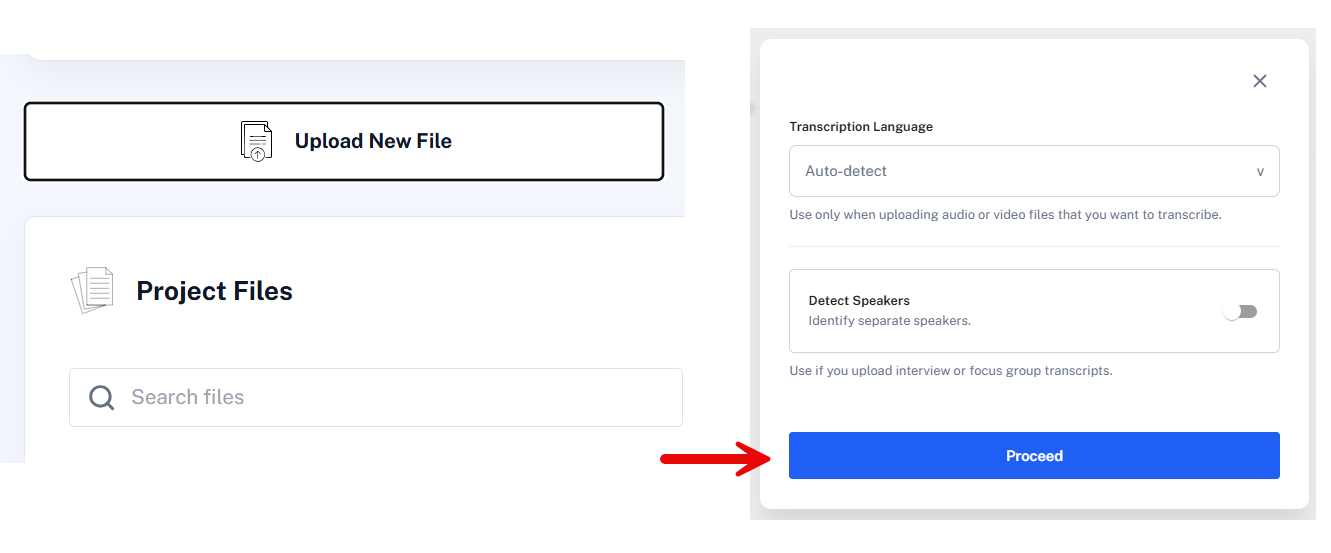
Transcripts prepared elsewhere. If your document is an interview or focus group transcript, select Detect Speakers when uploading so QInsights can identify who said what. See Transcript Formatting for the speaker-ID format QInsights recognizes reliably.
Reports, notes, and other text. For material that isn't a multi-speaker transcript - reports, observational notes, articles - click Upload New File, select the document, and click Proceed directly. There's nothing to transcribe or detect.
After upload
Each uploaded file appears as a document card. Use the three-dot menu to Preview, Rename, or See Speakers (for transcripts, an Edit option is also available - see Transcript Formatting).
If a document's Summary button appears faded, no summary was generated during import, usually due to a connection interruption during upload - delete and re-upload it rather than continuing to work with a file that has no summary. See Uploading Files.
Next steps
For transcripts specifically, continue to Transcript Formatting. For all Word documents, configure Data Context to add speaker roles or document characteristics before running an analysis.